
EdTech

EdTech, LMS, SCORM

SCORM Cloud Alternative for Training Providers | scormPROXY

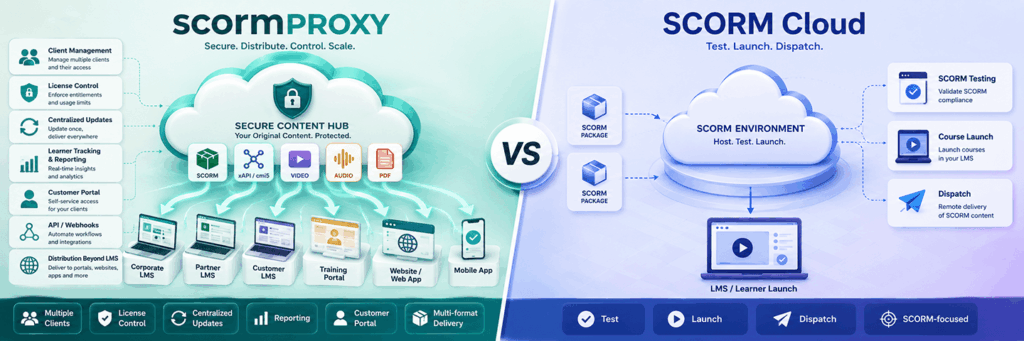
Looking for a SCORM Cloud Alternative? Key Factors Training Providers Should Compare If you sell, rent or distribute e-learning content to external clients, you may already know SCORM Cloud. It is one of the most established platforms in the e-learning industry and is often used to test, launch and dispatch SCORM content. However, not every organization looking for a SCORM Cloud alternative has exactly the same needs. Some companies only need a reliable way to launch or test SCORM packages. Others need a complete content distribution workflow: client management, license control, centralized updates, reporting, customer access, API automation and support for different delivery channels. This is where comparing SCORM Cloud alternatives becomes especially important.   What should you look for in a SCORM Cloud alternative? A good SCORM Cloud alternative should not only be able to deliver SCORM content remotely. It should also help you manage the operational and commercial side of distributing learning content to clients. Before choosing a platform, training providers should consider the following questions: Can I distribute courses to multiple external LMS platforms? Can I keep the original course files protected in the cloud? Can I update content centrally without asking clients to upload new files? Can I control the number of licenses available for each client? Can I define license duration and expiration dates? Can I track learner activity, progress and completion? Can my clients access a portal to download connectors or view reports? Can I distribute content outside an LMS, for example through links, websites or email invitations? Can I automate processes using an API or webhooks? Can the platform support formats beyond SCORM? For many content providers, these questions are more important than simply asking whether a platform can “dispatch” a course.   SCORM Cloud: a well-known solution for SCORM delivery SCORM Cloud is a mature and widely recognized platform. It is commonly used for SCORM testing, launching, dispatching and integration scenarios. For organizations that need a general-purpose SCORM environment, it can be a strong option. However, training providers that distribute content to many external clients often need more than content launch and dispatch. They need workflows for managing customers, connectors, licenses, reporting and ongoing commercial relationships. That is where a specialized platform such as scormPROXY can be a better fit.   scormPROXY: a SCORM Cloud alternative focused on client-based content distribution scormPROXY is a cloud-based content distribution and licensing platform designed for organizations that sell, rent or distribute e-learning content to external clients. Instead of sending the original course files to each client, scormPROXY allows you to host your content in the cloud and distribute remote connectors (dispatchers), links or invitations. Your clients can access the content from their own LMS, WordPress site, intranet, website, CRM, ERP or directly by email invitation. This makes scormPROXY especially useful for: Training providers selling courses to companies. E-learning vendors distributing catalogues to multiple clients. Publishers and academies that need to protect their content. Organizations that manage several client platforms. Businesses that need license control, reporting and centralized updates. 1. Content formats: SCORM, xAPI, video, audio and PDF When comparing SCORM Cloud alternatives, supported formats are an important factor. scormPROXY supports SCORM 1.2, SCORM 2004, xAPI, MP4, MP3 and PDF. This allows organizations to distribute not only traditional SCORM packages, but also multimedia and document-based learning materials from the same platform. This is important for training providers whose catalogue includes a mix of e-learning courses, videos, podcasts, PDFs and other digital learning assets. 2. Remote LMS client management One of the main differences between a generic SCORM dispatch platform and scormPROXY is the focus on remote client management. With scormPROXY, you can register and manage external clients, assign connectors, allocate licenses, define access conditions and monitor usage for each client. This is useful when each client has its own LMS or learning environment. Instead of treating every dispatch as an isolated package, scormPROXY helps you manage the client relationship around the content. 3. Distribution beyond the LMS Many organizations searching for a SCORM Cloud alternative are not only distributing courses to LMS platforms. Some clients may use WordPress, intranets, websites, ERPs, CRMs or other non-LMS environments. Others may not have a platform at all and may need direct email invitations. scormPROXY supports several distribution channels: SCORM/xAPI connectors for LMS platforms. Link-based access for non-LMS platforms. WordPress distribution. Email invitations for direct learner access. This flexibility can be especially useful for training providers that work with many types of clients. 4. License control and expiration rules For commercial course distribution, license control is essential. scormPROXY allows you to allocate licenses to clients, limit the number of available registrations, define license duration and set expiration dates. This helps training providers sell or rent access to content while keeping control over usage. This is particularly important when courses are sold by number of learners, duration of access or client contract. 5. Centralized content updates A key advantage of remote content distribution is the ability to update content centrally. With scormPROXY, the original content remains hosted in the cloud. When a course is updated, the provider can manage the new version centrally, reducing the need to resend original files to every client. For training providers with many clients and frequent course updates, this can significantly reduce support work and operational complexity. 6. Customer Portal scormPROXY includes a Customer Portal that allows clients to access selected features depending on their permissions. Clients can use the portal to view available products, download connectors, request licenses and consult reports. This creates a more professional and scalable workflow for content providers that manage multiple customers. For many training providers, this is one of the most important differences when evaluating SCORM Cloud alternatives. 7. Reporting and tracking Reporting is not only about knowing whether a learner completed a course. For commercial content distribution, reporting often needs to answer questions such as: Which clients are consuming the most licenses? Which products are being used? Which learners have started or completed training? Which licenses are active,

EdTech, LMS, SCORM

New scormPROXY Feedback Module. How does it work?

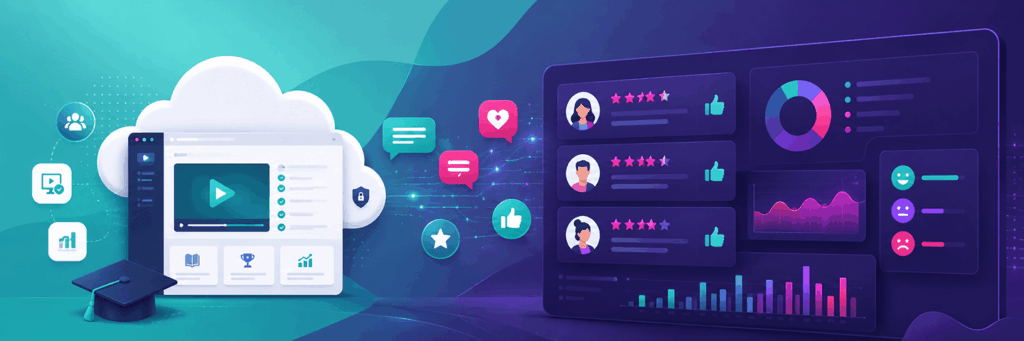
The new Feedback Module of scormPROXY allows you to collect information from end users (students) who access your content: Request the user accessing your content to provide their email address to enable more personalized follow-up with those users (e.g., sending a personalized completion certificate). Ask the user who has completed content to provide feedback on it. You can request a rating (from 1 to 5), a brief comment, or both.   All this information is collected in scormPROXY and can be reviewed through the ratings report.   How to configure the Feedback Module?   Go to the “Clients” section and select a client from the list (this could be a client with LMS, without LMS, or invited by email).   To assign licenses for new products to this client, click the “Add licenses” button.     In the license addition dialog, at the bottom right, you will find the settings for the Feedback Module:     If you wish to request the user’s email, select one of the available options in the “Request student email…” dropdown. Enable the “Make mandatory” checkbox if you want to force the user to enter their email to proceed. To request user feedback, enable the corresponding checkboxes under the “Upon content completion…” section.   To modify Feedback settings for already assigned licenses, select a license and click the “Modify” button. In the dialog that appears, you can adjust the Feedback options:     In the list of licenses assigned per client, you can see a series of icons in the “Feedback” column indicating which Feedback options are enabled (request email, request rating, and request comments, respectively).       How to review received ratings and comments?   Go to the main “Reports” section and then navigate to the “Ratings” report.   In this report, you can review all the ratings you’ve received for your content, filtering by time period, client, or course.   You can also export this report to Excel for sharing or archiving purposes.   How much does the Feedback Module cost?   The STANDARD plan of the scormPROXY Feedback Module is free and comes included by default in all scormPROXY accounts. The only limitation of this plan is that it allows receiving a maximum of 5,000 user comments. If you are interested in increasing this limit to receive more feedback, you can opt for one of the advanced Feedback Module plans:   Plan Limits Fee STANDARD 5,000 comments Free PRO 25,000 comments €50/month ADVANCED 100,000 comments €125/month ENTERPRISE 500,000 comments €250/month

Articles, EdTech

Knowledge Management in Businesses: Effective Strategies

Knowledge management is the driving force behind innovation, resilience, and sustainable growth in the business environment. This process is essential to ensure that information flows among employees, is shared efficiently, and contributes to addressing business challenges. In this context, collaboration and knowledge exchange are key elements that facilitate organizational growth and progress. In this article, we will explore effective strategies for knowledge management in businesses. We will highlight key practices ranging from building a continuous learning environment to leveraging innovative technological solutions. These business strategies are designed to boost operational efficiency and foster an organizational culture centered on learning and continuous improvement. What is knowledge management in businesses? Knowledge management in businesses involves the identification, capture, distribution, and efficient utilization of collective wisdom within the organization. This process goes beyond mere data accumulation; it is the creation of an ecosystem where information is collaboratively shared and transformed into a driver for sustainable growth. It is a comprehensive process that aims to optimize decision-making, foster innovation, and promote resilience to changes. Instead of each person having their own set of data, Knowledge Management ensures that everyone is on the same page. Why is this so important? Because when everyone shares what they know, the company can be more efficient, creative, and capable of adapting to rapid changes. Best practices for knowledge management in businesses Now that you know what knowledge management in businesses is, we must ask another important question: How do we transform information into a valuable asset? This is where some practices for Knowledge Management come into play. Build a continuous learning environment Promoting a culture of learning is essential for business development. When each team member adopts the role of a constant learner, innovation thrives. This way, knowledge management becomes a collaborative path toward continuous improvement. Implement innovative technological solutions It’s not just about accumulating information but doing so intelligently. Implementing innovative technological solutions facilitates access to information and transforms how we use it. It’s like giving the company digital superpowers to face challenges and stand out in an increasingly competitive environment. La integration of edtech tools in the knowledge management process accelerates the capture and distribution of information, while simultaneously transforming how employees access and apply their knowledge. For example, at WelcomeNext, we help companies implement, improve, or update their online training strategy using various technological solutions, such as the WelcomeLMS platform. By choosing WelcomeLMS, companies gain a modern, user-centered interface, tools that facilitate efficient access to information, and advanced features such as gamification and certification. These tools enable companies to excel in an ever-competitive business environment by fostering an organizational culture focused on learning and continuous improvement. Capture and document implicit knowledge Implicit knowledge, unlike information documented in manuals, encompasses the experiences and skills that team members have acquired throughout their careers. This type of knowledge is invaluable as it is based on daily practice and an intuitive understanding of job complexities. Learning to identify and document these experiences enriches the company’s knowledge base and strengthens collaboration among team members. Establish an intelligent organizational system An intelligent organizational system facilitates the search and use of knowledge when it is most needed. Ensure that every document, resource, or specific knowledge in your company has its precise location, clearly labeled and easily accessible to all team members. This not only saves time by eliminating unnecessary searching but also optimizes decision-making by ensuring that relevant information is within reach of everyone. Promote collaboration between departments When different departments work together, magic happens. Knowledge Management thrives on collaboration between areas, breaking down barriers and generating new ideas. It’s like a well-coordinated team playing in harmony to achieve business success. Encourage active employee participation When all employees are involved, knowledge flows. Encouraging active participation not only strengthens the workplace community but also enriches the company’s knowledge bank. Each employee, by sharing their knowledge and experiences, contributes to the collective wealth of wisdom. Use analytics to measure impact How do we know if we are on the right track? The answer lies in analytics. Using analytical tools allows us to measure the impact of our knowledge management strategies, providing concrete data for informed decision-making and continuous improvement. For example, Google Analytics can provide detailed information on how employees interact with online learning platforms. This includes data on the time spent on the platform, the most visited pages, and how they navigate through the content. Conclusion In conclusion, effective knowledge management in businesses is not just a practice but a philosophy that drives growth and innovation. From creating a culture of learning to implementing innovative technological solutions, each business strategy contributes to turning information into a valuable asset. Fostering collaboration, capturing implicit knowledge, and establishing intelligent organizational systems are key practices that strengthen the business fabric. As a result, knowledge management becomes the driving force that distinguishes leading companies, creating a path toward continuous success in a dynamic business environment.

Solutions

Contact

Complejo Empresarial ATICA
Edificio 5, 2ª Planta
Avenida de Europa 26
28224 – Pozuelo de Alarcón
Madrid – ESPAÑA

info@welcomenext.com

Solutions

About Us

Contact

Complejo Empresarial ATICA
Edificio 5, 2ª Planta
Avenida de Europa 26
28224 – Pozuelo de Alarcón
Madrid – ESPAÑA
info@welcomenext.com
+34 911845972

Subscribe to our Newsletter

Copyright 2013 – 2026 WelcomeNext S.L. | All rights reserved | Privacy Policy | Legal Notice | Cookies policy
Scroll to Top